How to Pay at 7-Eleven, Lawson, and FamilyMart in Japan (2026 Payment Guide)
This post may contain affiliate links. If you book or buy through them, we may earn a commission at no extra cost to you.
As of August 2026, every major Japanese convenience store chain accepts foreign-issued credit cards, transit IC cards, and PayPay, so cash is a backup rather than a requirement for most konbini visits. But the three big chains — 7-Eleven, Lawson, and FamilyMart — don’t all support exactly the same brands and rules, and foreign cards or apps sometimes fail in ways that aren’t obvious until you’re standing at the register. This guide compares the chains directly and covers what to do when something doesn’t work.
The short answer: what’s easiest for a first-time visitor
Visa, Mastercard, and JCB are the most widely accepted card brands in Japan[1], and a contactless (tap-to-pay) version of any of them is the simplest option at a konbini register — no app, no top-up, no Japanese phone number needed. A prepaid IC card such as Suica, Pasmo, or Icoca is arguably faster, since it’s a single tap with no card-network checks, and it also covers train and bus fare nationwide[2]. PayPay, Japan’s largest QR payment app, is accepted at all three chains, but as explained below, it is not straightforward to set up as a short-term visitor.
Payment methods accepted at Japanese convenience stores
- Credit and debit cards: Visa, Mastercard, JCB, American Express, and Diners Club are accepted at 7-Eleven, Lawson, and FamilyMart.
- IC transit cards: Suica, Pasmo, Icoca, and seven other regional cards work interchangeably nationwide as electronic money at all three chains[2].
- QR/smartphone payments: PayPay is accepted everywhere; LINE Pay, Rakuten Pay, au PAY, d払い, and others vary slightly by chain.
- Cash: Always accepted, and still necessary at some small independent shops and older machines[1].
Using a foreign-issued credit card (Visa, Mastercard, JCB)
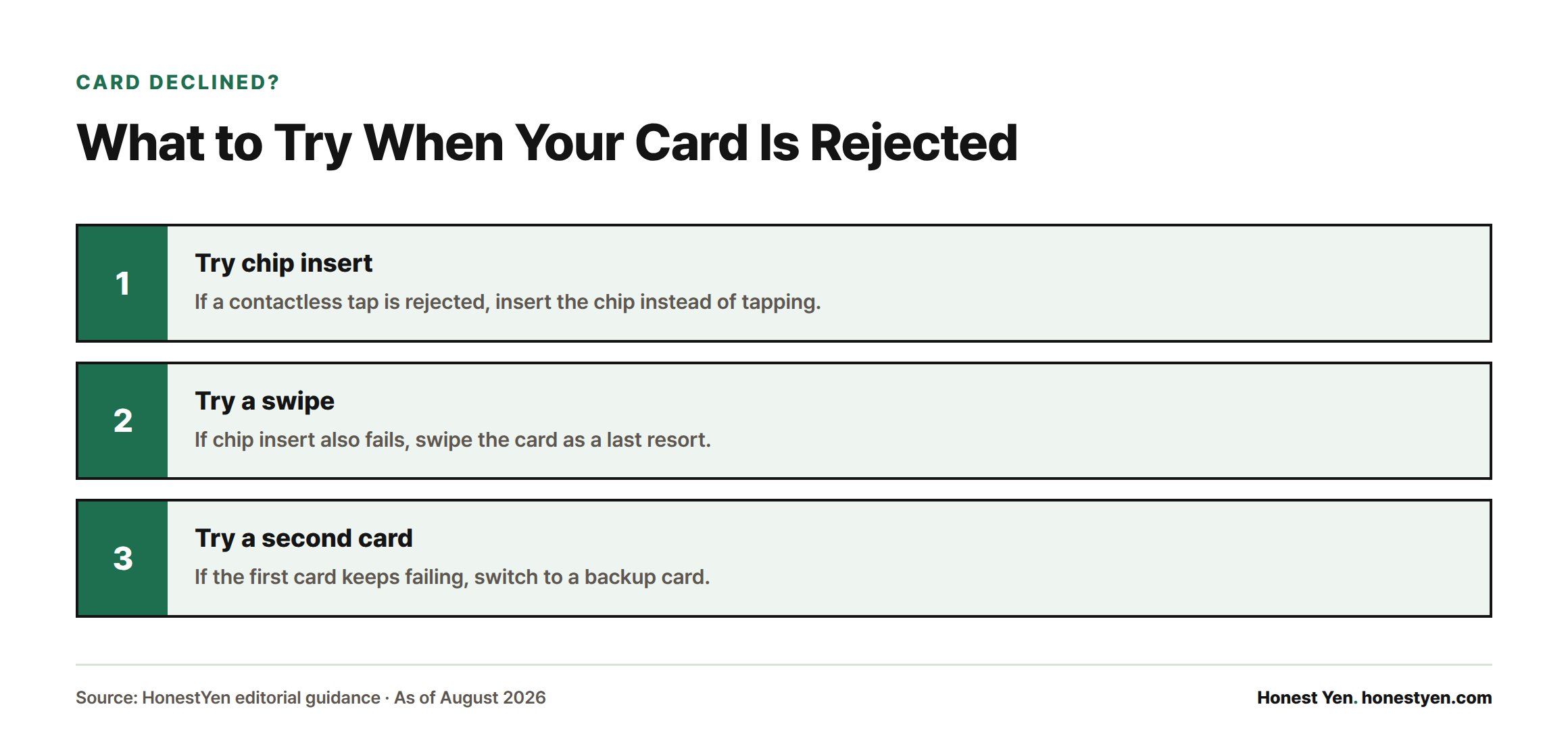
Foreign cards work like any other card at the register: tap if it’s contactless, insert the chip if not, or swipe as a last resort. At 7-Eleven specifically, no signature or PIN is required under ¥10,000, but purchases of ¥10,001 or more require a PIN or signature and cannot be tapped at all — the chip must be inserted[3]. That threshold rarely matters for a snack run, but it explains why a tap sometimes gets rejected on a bigger basket.
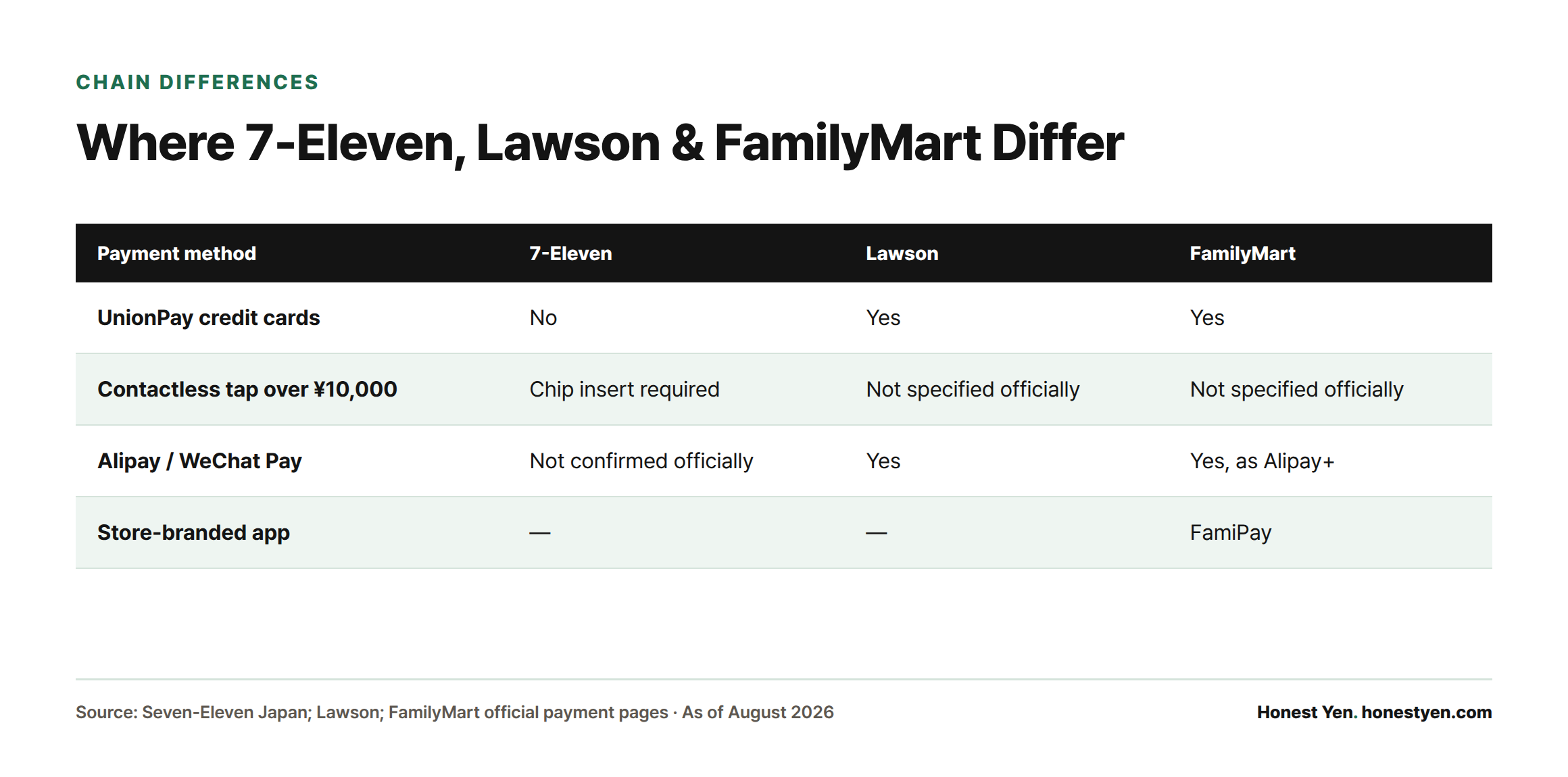
One chain-specific gap: 7-Eleven does not accept UnionPay-branded credit cards[3], while Lawson and FamilyMart do[4][5]. This mostly affects cards issued in mainland China, not Western-issued Visa/Mastercard/JCB.
If a card fails: try chip insert instead of tap, then swipe, then a second card. Overseas-issued cards commonly get declined in the first day or two of a trip because the issuing bank hasn’t yet seen a Japan transaction and flags it as suspicious, or because contactless limits differ from what the card is calibrated for at home. Since foreign-transaction fees and conversion rates vary a lot between card issuers, it’s worth checking in advance how your card actually converts yen — see this comparison of travel money cards for Japan if you haven’t settled on one.
Using an IC transit card (Suica, Pasmo, Icoca, and others)
Ten IC cards — Suica, Pasmo, Kitaca, TOICA, manaca, Icoca, PiTaPa, SUGOCA, nimoca, and Hayakaken — are mutually interoperable nationwide for train and bus fare and for store payments[2], and all are accepted at 7-Eleven, Lawson, and FamilyMart. Tap the card on the reader; the balance is deducted instantly with no signature or PIN.
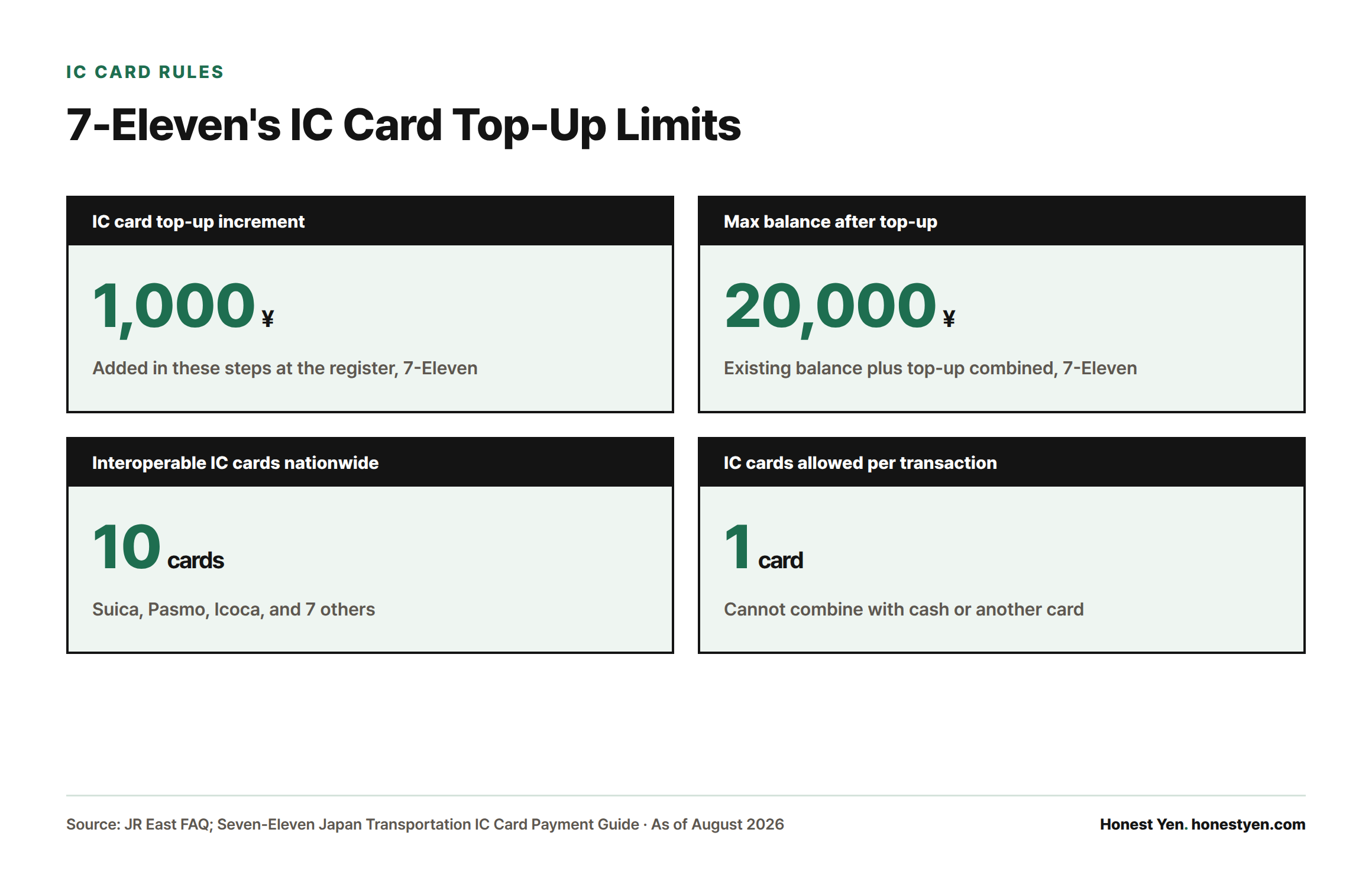
At 7-Eleven, cash can be added to an IC card at the register in ¥1,000 increments, up to a combined total (existing balance plus top-up) of ¥20,000, and only one IC card can be used per transaction — it cannot be combined with a second card, cash, or another electronic money method in the same purchase[6]. If the card’s balance is lower than the total due, the payment simply fails; the cashier will ask you to add cash to the card or switch payment methods rather than splitting the charge automatically.
QR and smartphone payments: PayPay, and the Kakao Pay / Naver Pay question
PayPay is accepted at all three chains for everyday purchases, though it can’t be used for certain items such as prepaid cards, stamps, postal items, or bill payments[7]. LINE Pay, Rakuten Pay, au PAY, and several smaller apps are also accepted, with the exact lineup varying by chain (see the table below).
Can a short-term visitor actually use PayPay? Not easily, on their own. Registering a PayPay account requires a Japanese mobile phone number — a foreign number cannot be used[8] — and a data-only tourist SIM or eSIM typically doesn’t provide one (see this SIM vs. eSIM comparison for what tourist plans actually include). Even with a Japanese number, PayPay balance can only be charged by bank transfer, cash at select ATMs, or a PayPay-branded credit card — a general foreign-issued Visa or Mastercard cannot be used to charge PayPay balance[9].
This is where Kakao Pay and Naver Pay actually come in. Since a June 2026 expansion, PayPay’s merchant network accepts scan-to-pay from 35 overseas payment services across 17 countries and regions, including South Korea’s Kakao Pay, NAVER Pay, and Toss, alongside Alipay+, WeChat Pay, and others[10]. This isn’t the same as using PayPay itself: instead, a traveler opens their own Kakao Pay or Naver Pay app, scans the store’s PayPay QR code at the register, and the amount converts and charges through their home app in their home currency[10][11]. In practice, this means a Korean traveler can pay at any of the three chains without ever installing PayPay or holding a Japanese phone number — as long as the store is using a scannable QR code rather than a tap-only terminal.
7-Eleven vs. Lawson vs. FamilyMart: payment methods compared
| Payment method | 7-Eleven | Lawson | FamilyMart |
|---|---|---|---|
| Visa / Mastercard / JCB / Amex | Yes[3] | Yes[4] | Yes[5] |
| UnionPay credit cards | No[3] | Yes[4] | Yes[5] |
| Contactless tap over ¥10,000 | Not allowed, chip insert required[3] | Not specified officially | Not specified officially |
| IC transit cards (Suica, Icoca, etc.) | Yes[6] | Yes[4] | Yes[5] |
| PayPay | Yes[7] | Yes[4] | Yes[5] |
| Kakao Pay / Naver Pay (cross-border scan) | Via PayPay QR[10] | Via PayPay QR[10] | Via PayPay QR[10] |
| Store-branded app | — | — | FamiPay[5] |
| Alipay / WeChat Pay | Not confirmed officially | Yes[4] | Yes, as Alipay+[5] |
None of the three chains’ official payment pages list a minimum purchase amount for card, IC, or QR payments — a ¥120 onigiri can be paid by card just as easily as a ¥3,000 basket.
When you’ll still need cash
Cash remains the fallback for some older self-checkout machines, small independent shops outside the major chains, temple and shrine offering boxes, and rural areas where cashless infrastructure is less consistent[1]. It’s also the simplest fix if your card, IC balance, and phone all fail at once — worth keeping a few thousand yen on hand for exactly that scenario, especially outside major cities.
Sources
- Japan National Tourism Organization, “Cashless Payments in Japan”
- JR East, FAQ on the Nationwide Mutual-Use IC Card Service
- Seven-Eleven Japan, Credit Card Payment Guide
- Lawson, Available Payment Methods
- FamilyMart, Available Payment Services
- Seven-Eleven Japan, Transportation IC Card Payment Guide
- Seven-Eleven Japan, PayPay Payment Guide
- PayPay, Help: What You Need to Use PayPay
- PayPay, Guide: Registering a Credit Card
- PayPay Corporation, Press Release: Expansion of Inbound Cross-Border Payment Services (June 29, 2026)
- PayPay, Merchant Help: About Alipay+ and Cross-Border QR Payments