Suica vs ICOCA: The Complete 2026 Comparison for Japan Travelers
This post may contain affiliate links. If you book or buy through them, we may earn a commission at no extra cost to you.
As of August 2026, both cards work the same way at nearly every train gate and convenience-store register in Japan, so for most trips the honest answer is: buy whichever is sold where you land. What matters is narrower than most guides suggest, refunds, mobile-wallet support, a few regional gaps, but it can still cost you money if ignored.
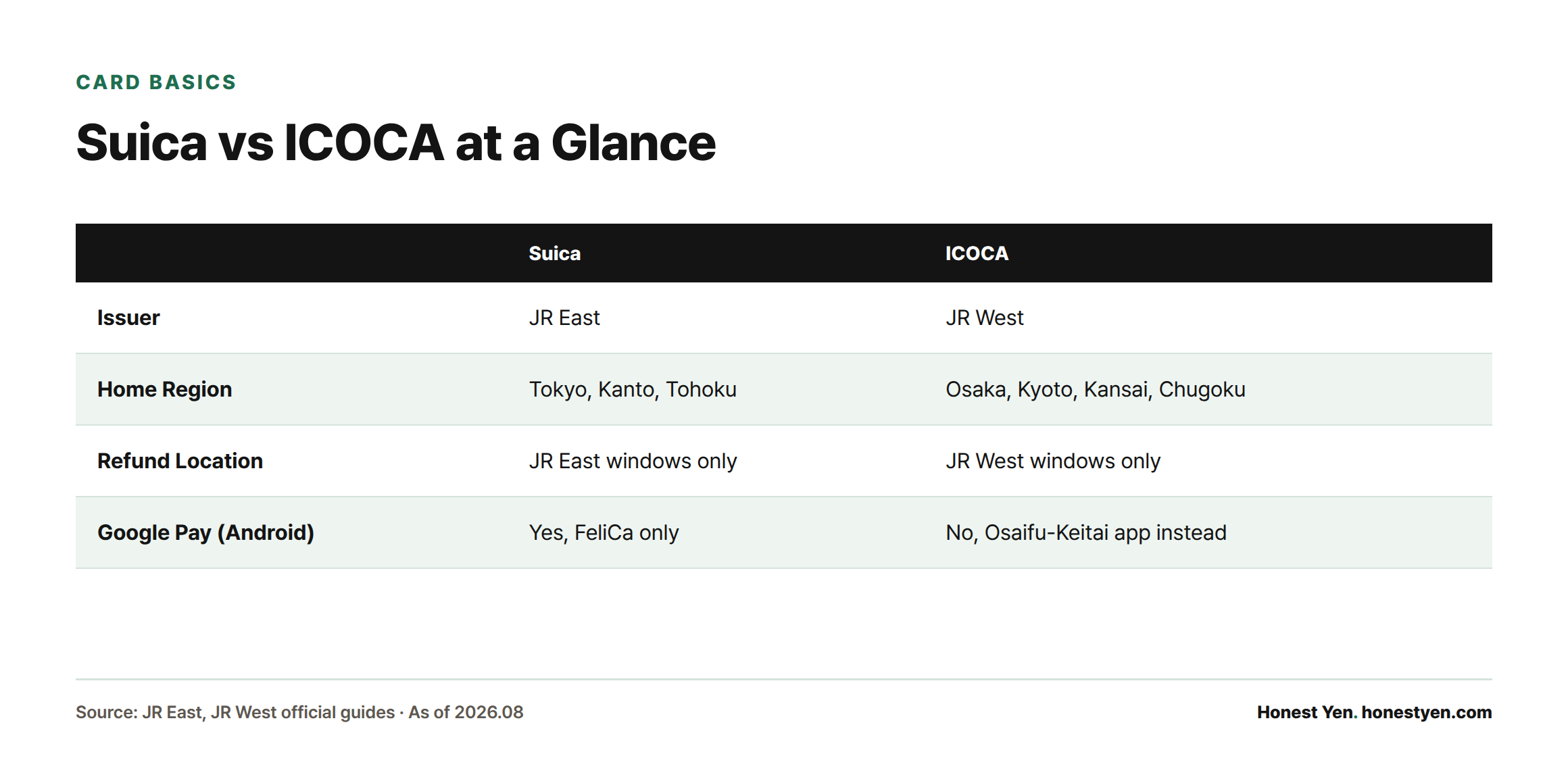
| Suica | ICOCA | |
|---|---|---|
| Issuer | JR East | JR West |
| Home region | Tokyo, Kanto, Tohoku | Osaka, Kyoto, Kansai, Chugoku |
| Visitor edition | Welcome Suica: 1,000/2,000 yen preloaded, no deposit[3] | 2,000 yen incl. 500 yen deposit[1] |
| Max balance | 20,000 yen | 20,000 yen[1] |
| Refundable where | JR East windows only | JR West windows only |
| Apple Pay | Yes | Yes[1] |
| Google Pay | Yes, FeliCa Android only | No, Osaifu-Keitai app instead[7] |
Suica and ICOCA: Same Product, Different Companies
Suica is issued by JR East, covering Tokyo, Yokohama, Sendai, and the wider Kanto and Tohoku regions. ICOCA is issued by JR West, covering Osaka, Kyoto, Kobe, and Chugoku. Both are contactless prepaid Felica cards that deduct fares automatically at the gate and offer no fare discount over paper tickets.
Nationwide Compatibility, and Where It Breaks Down
Suica, ICOCA, and eight other regional cards, Kitaca, PASMO, TOICA, manaca, PiTaPa, SUGOCA, nimoca, and Hayakaken, all work on each other’s networks nationwide[2]. A Suica bought in Tokyo works on the Osaka subway; an ICOCA bought at Kansai Airport works on the Tokyo Metro.
Two exceptions: ICOCA trips are capped at 200 km within the JR West network, so long JR trips still need a paper ticket[2]. Ordinary balance also can’t pay most Shinkansen fares, that needs the separate registration covered below. A few rural lines outside the ten-card network still take cash only.
Price, Deposit, and What You Get Back
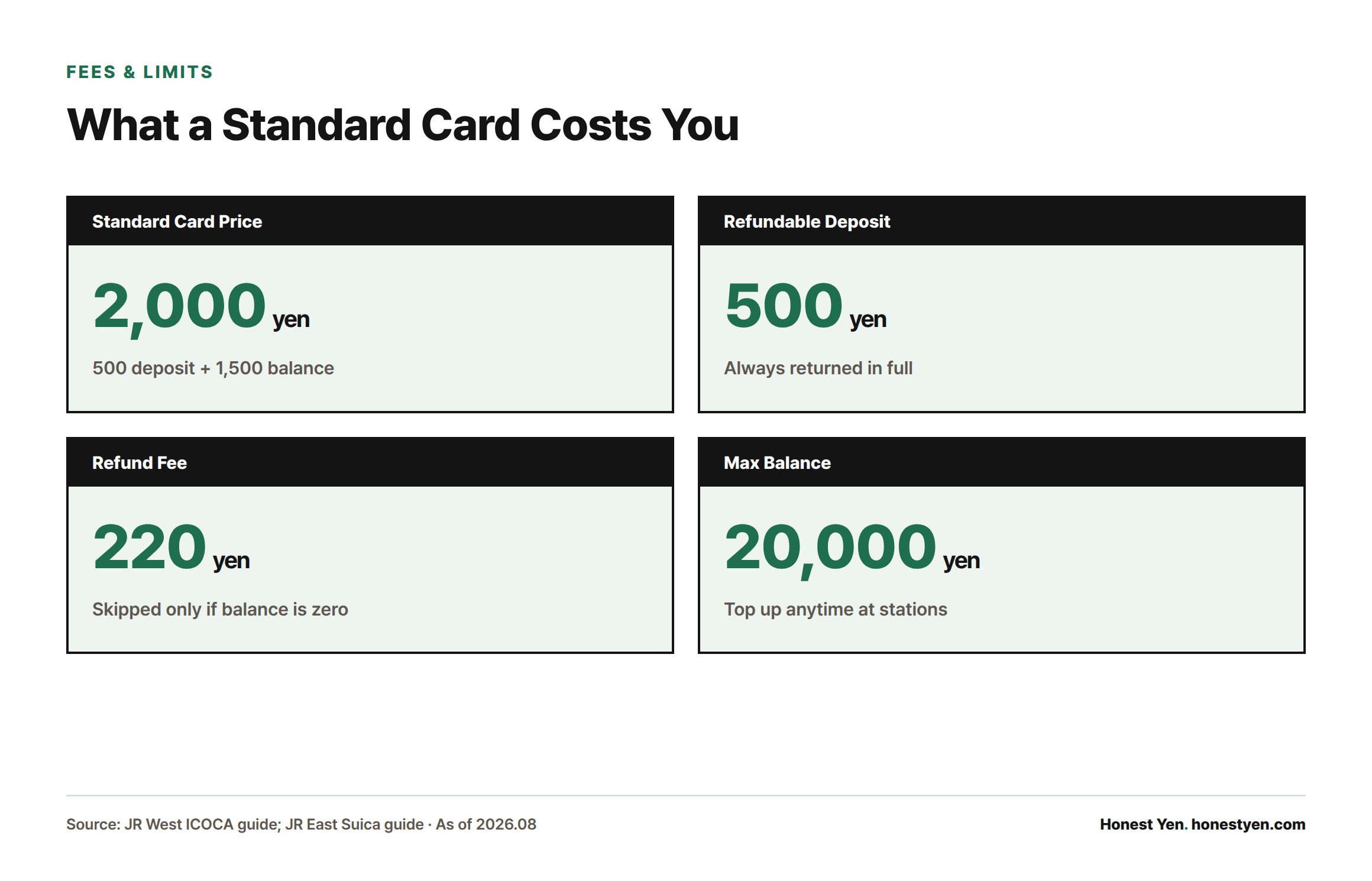
A standard ICOCA, including the foreign-visitor design sold at Kansai Airport Station, costs 2,000 yen: 500 yen refundable deposit plus 1,500 yen balance[1]. A standard Suica works the same, a 500 yen deposit plus whatever balance you add. Both hold up to 20,000 yen and top up indefinitely at any station machine or convenience store[1].
JR East’s tourist-only Welcome Suica skips the deposit: 1,000 or 2,000 yen preloaded, but it self-deactivates 28 days after first use and forfeits any leftover balance, no refund at all[3]. Fine for a short trip only.
The Refund Trap: Your Card Only Cashes Out at Home
A standard Suica can only be refunded, deposit plus balance minus a 220 yen fee, at a JR East ticket window; a standard ICOCA only at a JR West window[3]. Buy a Suica in Tokyo and fly home from Kansai, and there’s no JR East counter there to refund it. The 500 yen deposit always comes back in full even if your balance can’t cover the fee, but the fee is skipped only if balance is already zero. Spend it down before you fly.
Mobile Cards: Apple Pay Is Easy, Android Is Not
Both cards load onto an iPhone’s Apple Pay wallet and top up by credit card, no machine required[1]. Android splits the two: Suica works through Google Pay on phones with a Japan-activated FeliCa chip, restricted on non-Japan-market Pixels and many global Android models[8]. ICOCA has no Google Pay integration; Mobile ICOCA for Android runs through Japan’s Osaifu-Keitai app instead, needing Android 10+ and a Google account signed into that app[7].
Which One Should You Buy?
- Landing in Tokyo, staying in Kanto: get a Suica, or Welcome Suica for a short trip.
- Landing in Osaka or Kyoto, staying in Kansai: get an ICOCA at Kansai Airport Station.
- Visiting both regions: buy whichever your arrival airport sells; either works at both ends, only the refund location changes.
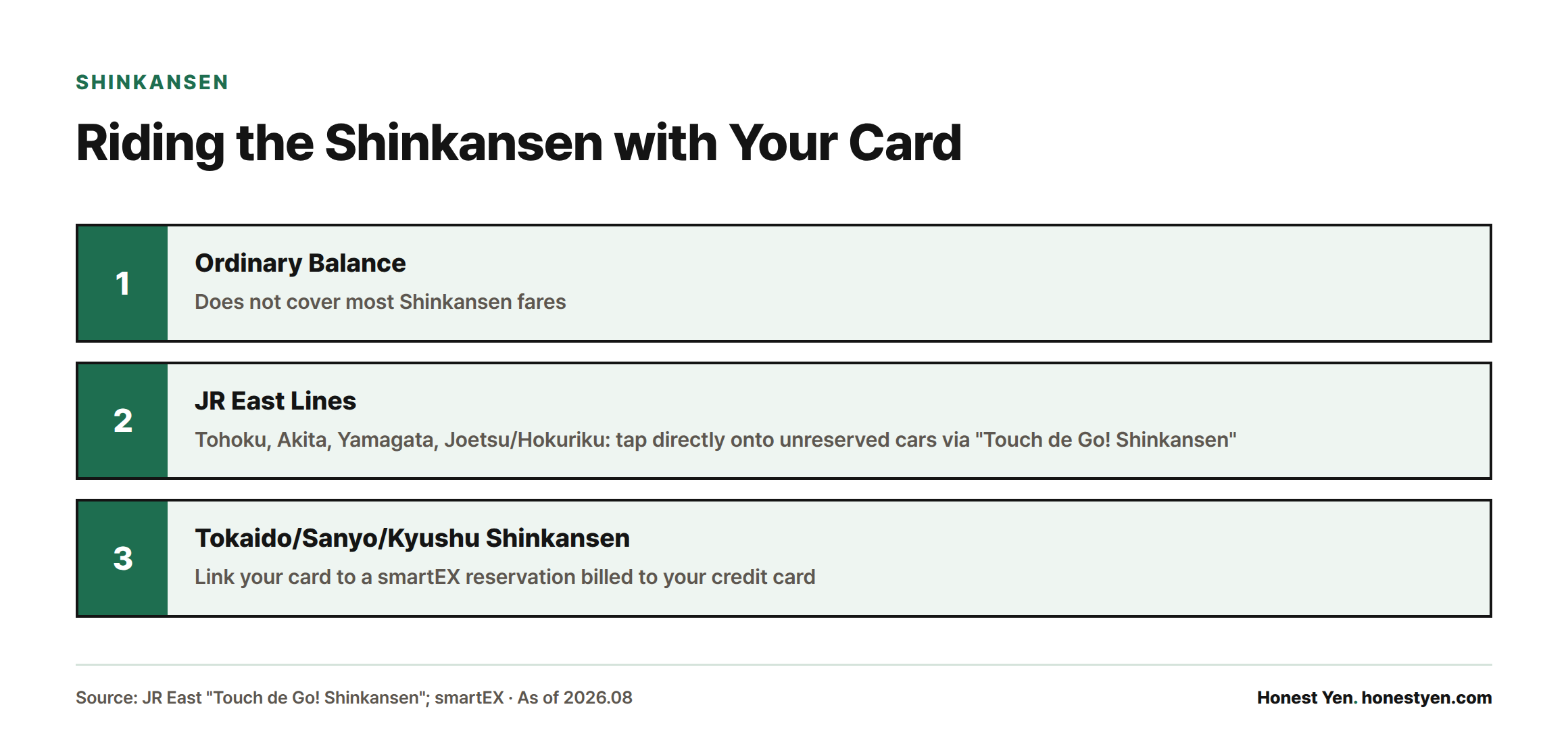
- Taking the Shinkansen: ordinary balance doesn’t cover most Shinkansen fares. JR East’s Tohoku, Akita, Yamagata, and Joetsu/Hokuriku lines let a registered Suica tap directly onto unreserved cars via “Touch de Go! Shinkansen”[5]; the Tokaido/Sanyo/Kyushu Shinkansen instead links your card to a smartEX reservation billed to your credit card[6]. See our guide on how to book the Shinkansen and choose your seat.
Frequently Asked Questions
Should I buy Suica or ICOCA?
Whichever is issued in the city you land in first; both work almost everywhere, the main consequence is where you can later get a refund.
Can I use a card from another region?
Yes, ICOCA works at Tokyo’s gates and Suica at Osaka’s[2]. Exceptions: trips past the 200 km ICOCA cap, most Shinkansen rides, and a few local lines outside the network.
How do I refund unused balance, and is there a fee?
Only at the issuer’s ticket window, JR East for Suica, JR West for ICOCA, minus a 220 yen fee; the 500 yen deposit always returns in full[3]. Welcome Suica has no refund option.
Can I ride the Shinkansen with these cards?
Not by simply tapping a balance, see the Shinkansen note above[5][6].
Can I get a mobile version through Apple Pay or Google Pay?
Suica works on both[8]; ICOCA works on Apple Pay but on Android only through Osaifu-Keitai, not Google Pay[7].
What’s different about Welcome Suica?
No deposit, preloaded with 1,000 or 2,000 yen, but expires 28 days after first use with no refund of leftover balance[3][4].
Sources
- JR-West, “ICOCA – How to use JR-West”
- JR-West, ICOCA usable area and nationwide IC card interoperability
- JR East, “Suica”
- JR East, “Welcome Suica”
- JR East, “Use on the Shinkansen (Touch de Go! Shinkansen)”
- smartEX, “Boarding with an IC card”
- JR-West (JR Odekake Net), “Mobile ICOCA for Android”
- Google Wallet Help, “Pay with Suica & PASMO on your smartwatch (Japan only)”