SIM vs eSIM vs Pocket WiFi in Japan: A Real Price and Pickup Comparison (2026)
This post may contain affiliate links. If you book or buy through them, we may earn a commission at no extra cost to you.
As of August 2026, anyone flying into Narita, Haneda, or Kansai faces the same first decision: how to get online. The three real options are a physical prepaid SIM, a digital eSIM profile, or a rented pocket WiFi router. Below is what each actually costs for a short trip, how they compare side by side, and where to pick one up at each airport.
- Traveling solo with one phone: an eSIM is usually the cheapest and skips the airport counter entirely.
- Couple sharing an itinerary: two eSIMs, or one pocket WiFi router split two ways, land at a similar price — pick based on whether you want to walk together or split up.
- Family or a group of three or more: a single pocket WiFi router shared across everyone’s phones is almost always cheaper per person, since one rental fee covers the whole group.
SIM, eSIM, and Pocket WiFi, Explained
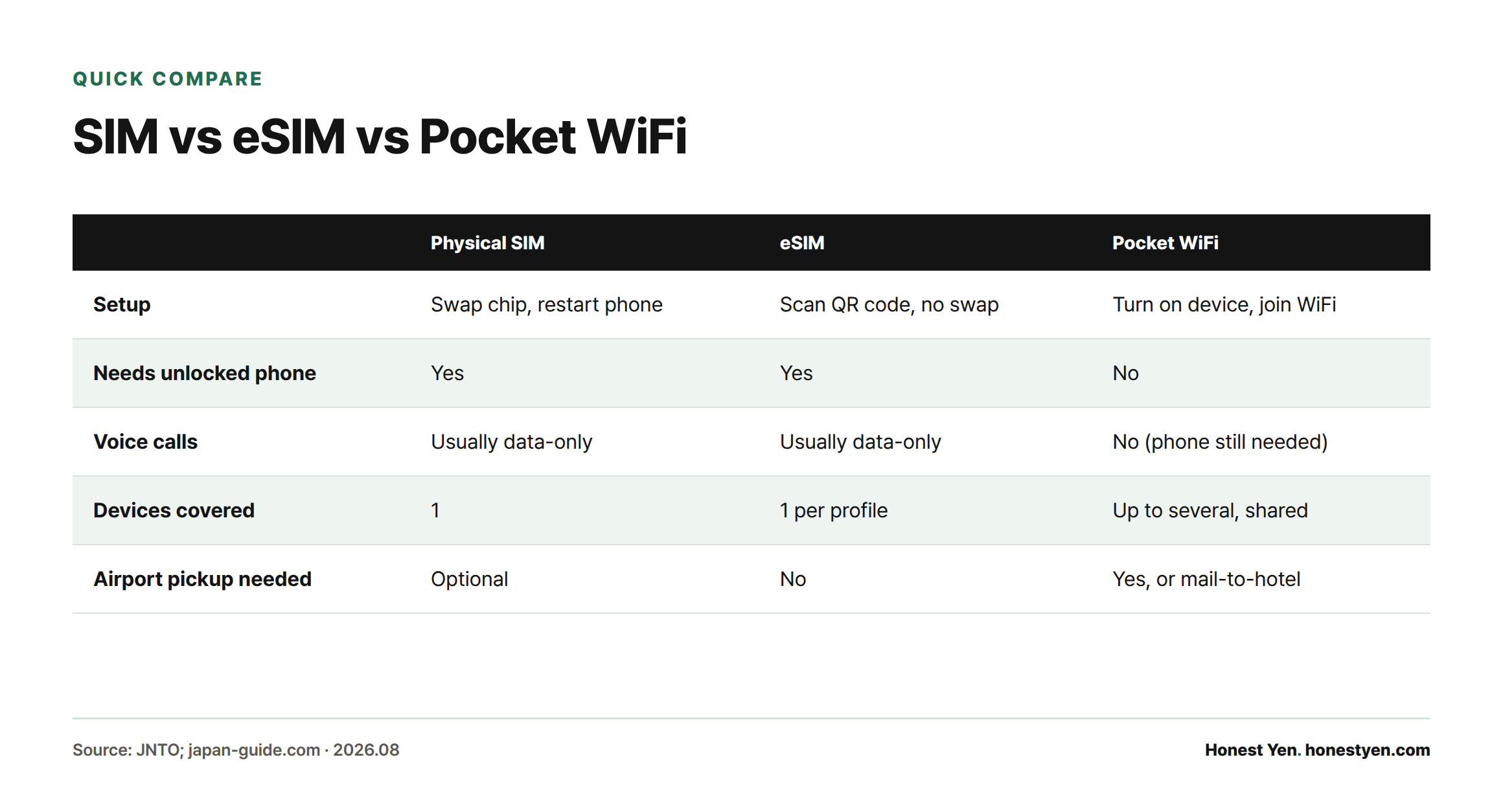
A physical SIM is a small chip you swap into your phone’s SIM tray, sold at airport counters, electronics stores like Bic Camera and Yodobashi, or vending machines. An eSIM is the same idea without the chip: a digital profile installed by scanning a QR code before you fly, built into every iPhone and most Android flagships sold since around 2018–2020. A pocket WiFi is a separate battery-powered router, rented for the trip, that creates its own WiFi hotspot for your phone (and everyone else’s) to join. Both SIM and eSIM require an unlocked phone; pocket WiFi does not, since your phone only connects to it over WiFi[1][2].
At a Glance
| Physical SIM | eSIM | Pocket WiFi | |
|---|---|---|---|
| Setup | Swap chip, restart phone | Scan QR code, no swap | Turn on device, join WiFi |
| Needs an unlocked phone | Yes | Yes | No |
| Voice calls | Usually data-only | Usually data-only | No (phone still needed for calls) |
| Devices covered | 1 | 1 per profile | Up to several, shared |
| Airport pickup needed | Optional (or buy on arrival) | No | Yes, or mail-to-hotel |
Most tourist SIM and eSIM plans, including the tradeoffs covered in our eSIM-vs-physical-SIM breakdown, are data-only with no Japanese phone number; a few operators, such as Mobal, sell add-on voice and SMS for travelers who need to make local calls to restaurants or hotels.
Real Prices for a 4-Day and a 6-Day Trip
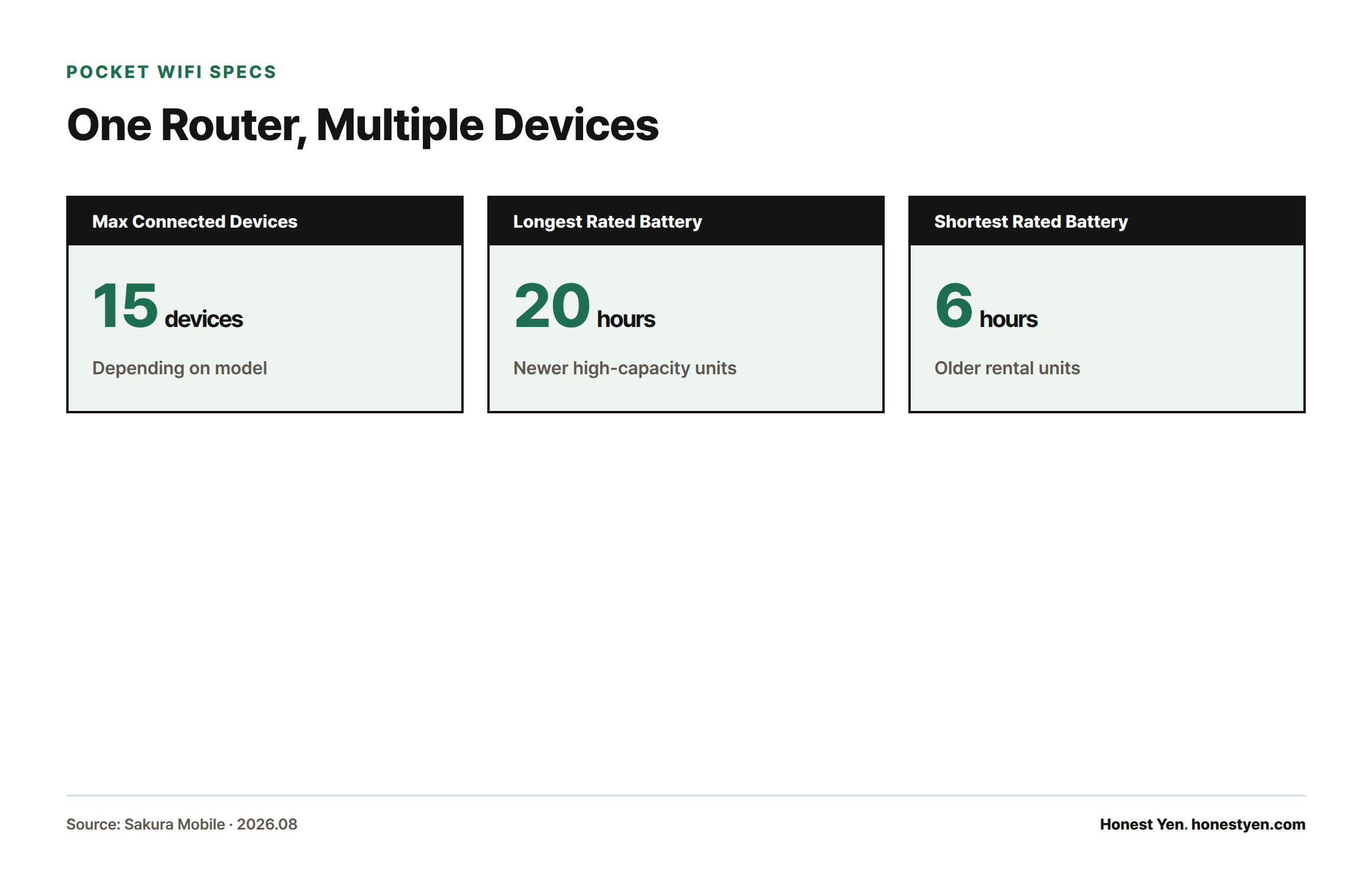
Pocket WiFi pricing scales cleanly by day and is easy to compare directly. Sakura Mobile’s unlimited-data pocket WiFi, for example, lists ¥6,300 for 4 days and ¥8,700 for 6 days, with the device supporting up to 15 connected devices and a rated 20-hour battery[6]. Split across four travelers, that is roughly ¥1,575–¥2,175 per person for the whole trip.
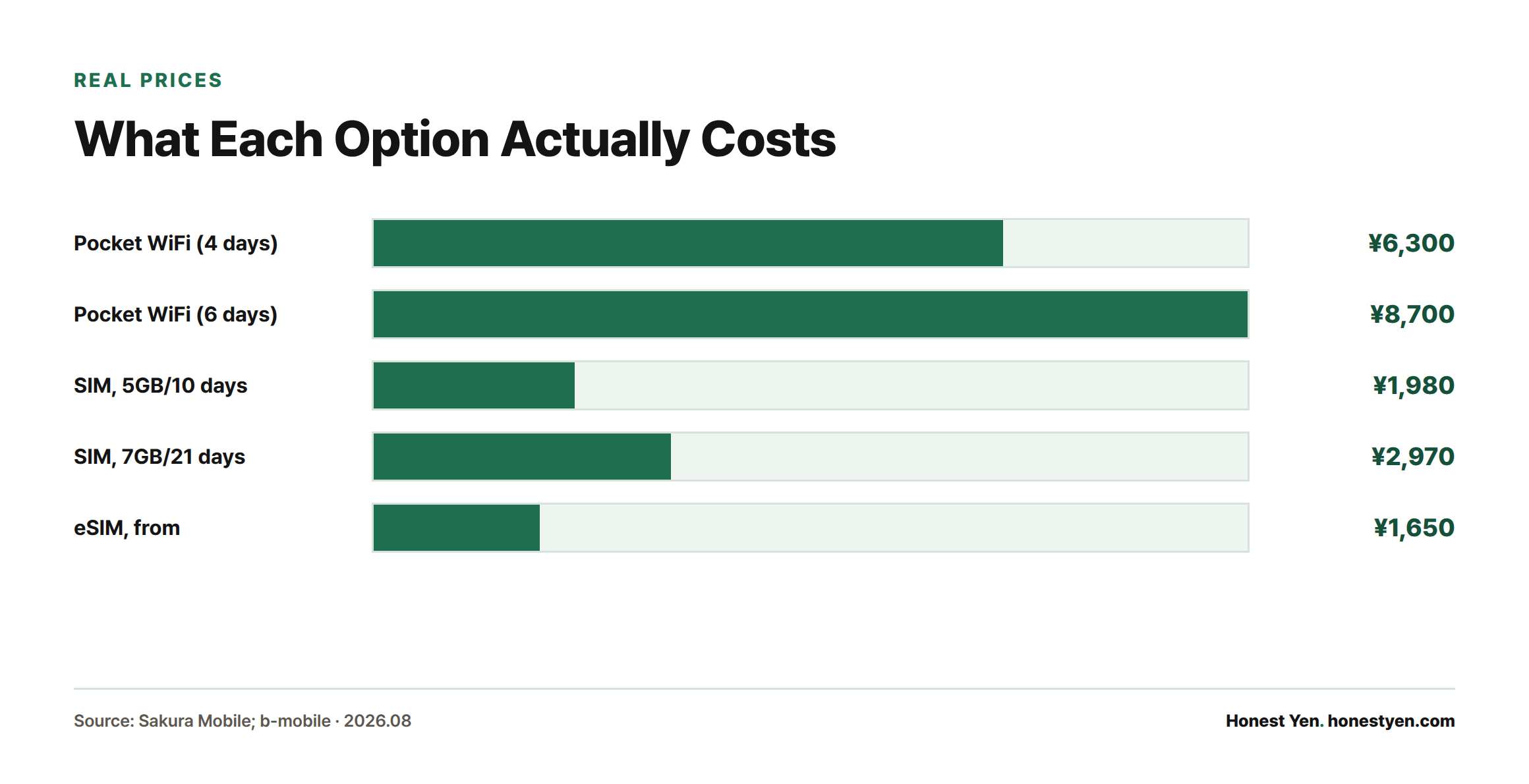
Physical SIM pricing is usually sold in fixed data blocks rather than by the day. b-mobile’s Visitor SIM, a long-running docomo-network option sold at Japan Post and electronics stores, lists 5GB valid for 10 days at ¥1,980 and 7GB valid for 21 days at ¥2,970, data-only with no voice service[7]. For a 4-day trip that means paying for more days or data than you’ll use, since sub-week tiers are rare.
eSIM pricing runs on the same logic as pocket WiFi rental — priced per day, scaling with duration — and Sakura Mobile’s unlimited eSIM plans start from ¥1,650 (tax included) at the shortest tier, rising with each extra day selected[6]. For one traveler, that undercuts pocket WiFi; for a group, it doesn’t, because every phone needs its own eSIM.
Which Should You Choose?
Solo traveler: an eSIM installed before departure is the least friction — no counter, no queue, and typically the lowest per-person cost for a single device.
Couple: compare two eSIMs against one shared pocket WiFi. If you’ll often split up during the day, two eSIMs make more sense than one router neither of you is carrying.
Family or group: one pocket WiFi router shared across phones, tablets, and laptops is usually the cheapest total cost and the simplest to manage — one device to charge and return instead of several separate SIMs.
Picking Up and Returning at the Airport
All three major Tokyo/Osaka gateway airports have on-site counters, though hours and exact locations vary by operator.
Narita: Rental and SIM-sales counters are clustered in the arrivals areas of Terminals 1 and 2, generally open from around 6:30–7:00 a.m. to 9:00–9:30 p.m.; Terminal 3 has no dedicated counter, so travelers there use a short shuttle or walk to T1/T2[3]. If you’re heading into central Tokyo afterward, see our comparison of Narita-to-Tokyo transport options.
Haneda: Terminal 3 (international) has the most counters, including a Mobile Center on the 2F arrival lobby (6:30 a.m.–11:00 p.m.) and a 3F departure-lobby counter; Terminals 1 and 2 have SIM vending machines and smaller counters, but no dedicated WiFi rental desks[4].
Kansai (KIX): Multiple operators run counters on the 1F arrival and 4F departure levels of Terminal 1, most open roughly 6:00 a.m.–11:00 p.m., plus SIM vending machines available 24 hours; Terminal 2 has more limited hours[5].
eSIMs skip this step entirely — install the profile at home over WiFi before you fly, and it’s active the moment you land.
Frequently Asked Questions
Which is cheapest: SIM, eSIM, or pocket WiFi?
For one traveler, eSIM is typically cheapest since pricing scales by day with no device to rent. For three or more people sharing, pocket WiFi usually wins because one rental fee covers every device in the group[6].
Is pocket WiFi better for groups?
Yes — a single router can serve up to around 15 connected devices depending on the model, so a family or tour group can share one rental instead of buying a SIM or eSIM per person[6].
Can I pick up and return at the airport?
Yes, all three major airports have same-day counters for pocket WiFi and physical SIM, though hours differ by terminal and operator, and not every terminal has a desk (Narita T3, for instance, does not)[3][4][5].
Do the latest iPhones and Galaxy phones support eSIM?
Every iPhone from the XS/XR (2018) onward supports eSIM, and US-market iPhone 14 and later ship without a physical SIM tray at all, relying on eSIM only[9]. Most Android flagships from around 2020 onward, including Galaxy S20-and-later and Pixel 4-and-later models, also support it — check Settings for an “Add eSIM” option, or dial *#06# to see if an EID number appears, to confirm your specific device and carrier.
Does pocket WiFi battery last all day?
It depends heavily on the device: rated battery life among rental operators ranges from around 6 hours on some older units up to 20 hours on newer high-capacity models, so it’s worth checking the specific device’s rating rather than assuming a blanket “all day” figure[6].
What happens if I forget to return the pocket WiFi?
Terms vary by operator, but as an example, one major rental company charges a late fee starting the third day after your return date, and treats the unit as lost if it hasn’t arrived back within 10 days — triggering a fixed penalty charge, doubled if you don’t respond to their follow-up[8]. A physical SIM or eSIM carries no such risk since there’s no device to lose.
Sources
- Japan National Tourism Organization, “Wi-Fi and connectivity in Japan”
- japan-guide.com, “Internet in Japan”
- Narita International Airport, “Cellular Phone, Wi-Fi Rental, SIM Card Sales Locations”
- Haneda Airport Passenger Terminal, “Cell Phones / Wi-Fi Rental, SIM Cards”
- Kansai International Airport, “WiFi, cell phones”
- Sakura Mobile, “Prepaid Prices: eSIM, SIM & Pocket WiFi for Japan”
- b-mobile Visitor SIM, “Plan Description”
- Japan Wireless, “Terms and Conditions”
- Apple Support, “Learn which type of SIM your iPhone or iPad uses”